Know where your OpenSpec change stands, without leaving Claude Code
openspec-hud is a free, open-source Claude Code plugin that shows your OpenSpec flow step, tasks, agents, context and usage in one compact panel, right where you work.

If you build with OpenSpec and Claude Code, you know the drill. You propose a change, apply it task by task, and somewhere in the middle you lose the thread. Which step am I on? How many tasks are left? Is that subagent still running? How much context do I have before the window fills up?
The answers are all there, in tasks.md, in the session and in the status line. They are just not in one place, and checking them means breaking your flow.
openspec-hud puts them in one place. It is a free, open-source Claude Code plugin that shows your OpenSpec flow in a compact panel while you work.
What it shows
- Your flow step. The current step (
explore,propose,apply,verifyorarchive), taken from the last OpenSpec skill or/opsx:*command you ran. If you have not run one, it works the step out from the change's files: notasks.mdmeans propose, open tasks means apply, all done means verify. - Tasks at a glance. A progress bar,
done/total, how many are left, the task in progress and the next one. It refreshes after edits underopenspec/, at the end of each turn and every 10 seconds. - Agents and MCP calls. The subagent that is running right now, with its type, status and description, plus the MCP server and tool being called.
- Context and cost. A context-window bar, tokens used out of the window, your 5-hour and 7-day rate limits on subscriptions, and session cost. Context and limits turn from green to yellow at 60% and red at 85%, so you see trouble coming.
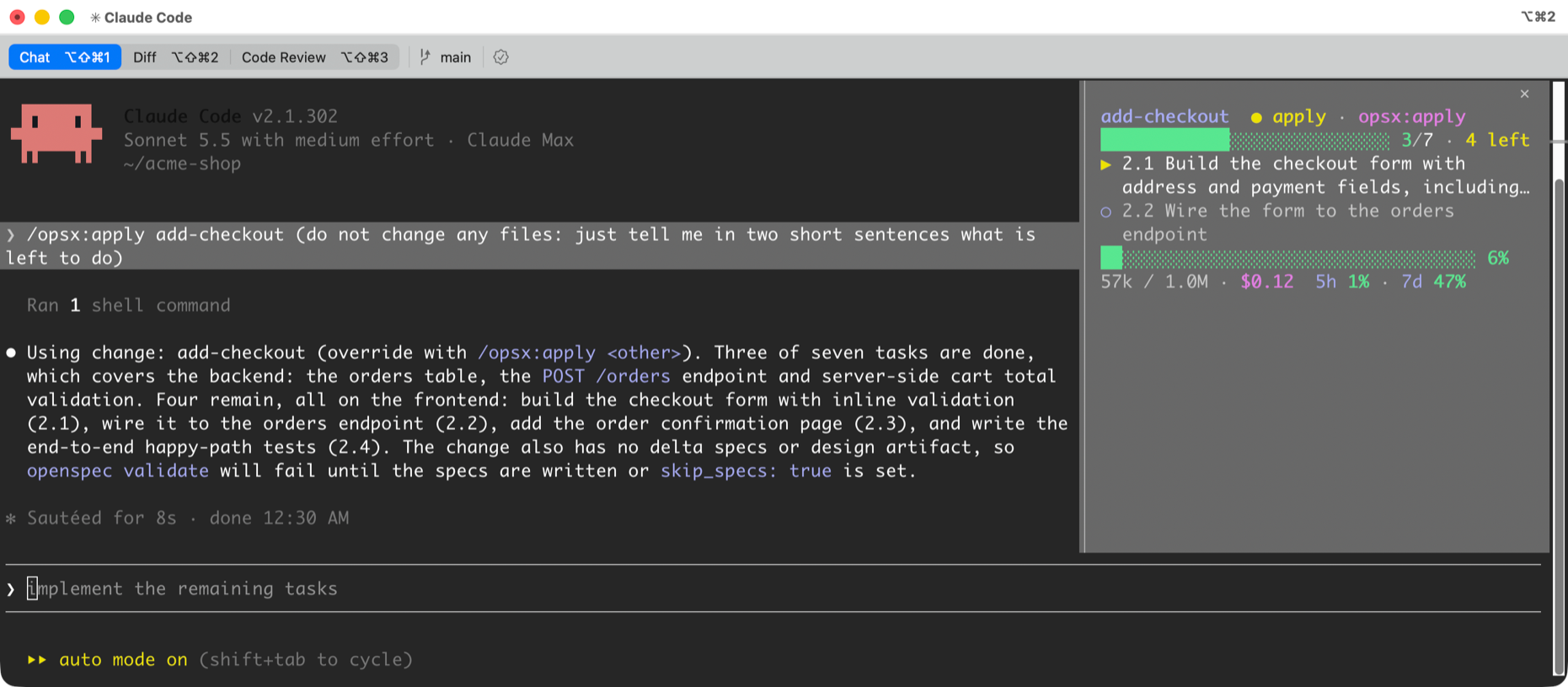
It stays small on purpose: 8 to 10 rows, 14 at most, no headings. Long task names wrap to two rows and end with an ellipsis instead of getting clipped, and in a wide pane short rows sit side by side.
Every change at once
Sometimes you want the whole board, not just the change you are on. Run /openspec-changes and a second panel lists every active change with its own progress bar and tasks left. The change the HUD follows comes first, marked ▶.
Two layouts
In the fullscreen terminal UI at 110 columns or wider, the HUD docks as a side panel next to the transcript, so it is always in view without taking space from the conversation. In the classic UI or a narrow terminal, it opens inline above the prompt instead.
To get the side panel, set "tui": "fullscreen" in ~/.claude/settings.json, or pick it in /config.
Install it
At the prompt of a Claude Code session:
/plugin install openspec-hud --marketplace Dash-AI-Tools/openspec-hud
Answer y to add the marketplace, then pick a scope: User for every session, or Project for one repository. The panel opens right away.
Then, in a repo that uses OpenSpec, run a command such as /opsx:propose <idea> and the HUD follows along. Use /openspec-hud to show or hide it, and /openspec-changes for the full list.
Open source, and yours to shape
openspec-hud is MIT licensed and lives on GitHub at Dash-AI-Tools/openspec-hud. Read the code, change it, send a pull request.
It is also early. If you use OpenSpec with Claude Code and there is something you wish you could see at a glance, tell us. What you ask for decides what we build next. Open an issue and say what you need.
Download openspec-hud and give it a try.
Also open issues if you have ideas, feedback or requests